
Tesla charging history
Tesla charging history, one session at a time
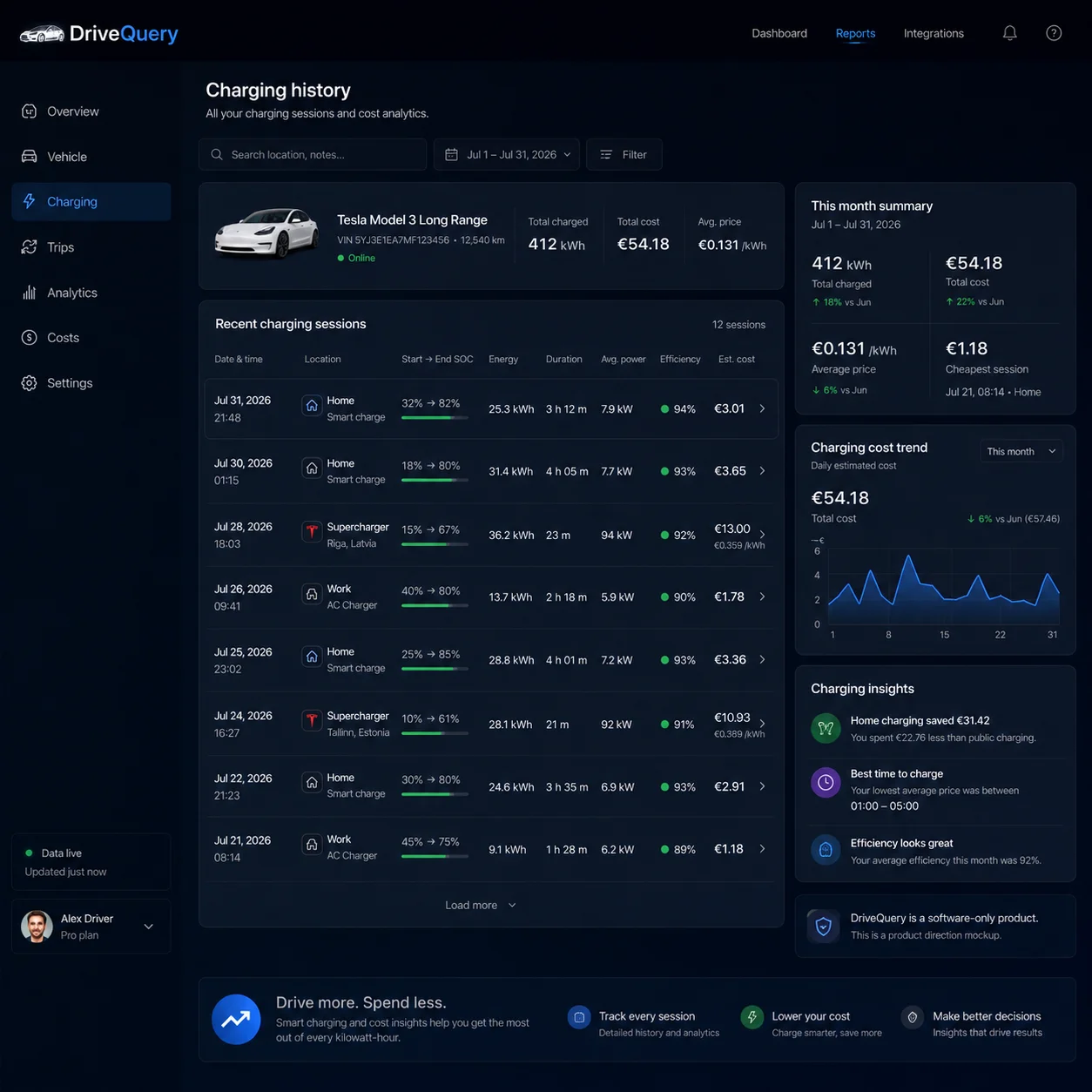
Tesla already gives owners useful charging statistics. DriveQuery is being built to preserve a vehicle-centered history where individual charging events can keep their energy, place, cost basis and trip context together.
Tesla's current support pages say Charge Stats can show data from the start of vehicle ownership or January 1, 2022, whichever is later. A registered Wall Connector can show 12 months of individual charging sessions. Official sources are linked below.
What Tesla already provides
Tesla charging history is already useful — but it is split across different views
There is no need to pretend the Tesla app starts from zero. Tesla currently provides several strong charging views. They simply answer different questions.
| Current Tesla view | What it shows | Important limit |
|---|---|---|
| Charge Stats | Charged energy, estimated spend, average cost per kWh, location types and time-of-use distribution | Tesla says charging is aggregated by location type for each day rather than presented as a full vehicle-wide session list |
| Registered Wall Connector | 12 months of individual charging sessions, including session duration and delivered energy | It is charger-side history for that Wall Connector |
| Supercharging history | Tesla charging transactions plus downloadable invoices | It covers Tesla Supercharging, not every home or third-party public session |
DriveQuery's role: build a vehicle-centered record across the charging activity the connected vehicle can report, then keep trip, place, rate and export context close to it. Availability depends on the data captured from the vehicle and connected Tesla services.
Session-level context
A monthly total tells you what happened. A session tells you why.
When charging cost changes, the useful question is often not “how much this month?” but “which sessions created the difference?”
Start, end and duration show whether charging landed in the rate period you expected.
Home, a user-defined place, public charging or Supercharging should not all be treated as the same cost source.
Keep the reported energy amount and its measurement source visible.
Attach the billed amount or the rate assumption used to estimate cost.
Drive142 mi road tripTrip history
Charge36.4 kWh SuperchargerBilled session
Drive61 mi homeTrip history
Charge24.8 kWh overnightHome rate estimate
With driving beside charging, you can investigate cost per mile, charging behavior and whether a rate change actually improved the outcome. See the Tesla trip history side of the record →
Cost integrity
Do not hide how a charging cost was calculated
A dollar figure can come from very different sources. Treating them as equivalent makes history look cleaner than the underlying data really is.
Energy × the applicable rate. Useful only when the rate period and rate assumption are retained.
Keep the transaction amount distinct from calculated home energy cost.
Use a receipt, known price or explicit manual estimate rather than silently inventing a tariff.
For home charging, Tesla Charge Stats can already use utility rate plans and custom time-of-use periods. DriveQuery's charging-cost pages explain the same principle in calculator form: home charging cost and Tesla charging cost.
History vs export
Review on screen. Export when the record needs to travel.
Use the timeline to find unusual sessions, compare places and understand patterns.
Use rate context to explain what an event or month likely cost.
Move the structured record into CSV or a report for deeper analysis, reimbursement or archiving.
Accuracy
Show gaps and timing differences instead of pretending every source is identical
Tesla says Charge Stats data can take up to 24 hours to update depending on vehicle connectivity, and a charge that crosses midnight can be split across two daily bars. That is a good example of why aggregated app statistics and a captured session timeline should not be treated as the same dataset.
Time, energy and place agree well enough to form a useful record.
Do not fabricate a missing duration, energy amount or rate.
Keep calculated home cost distinct from billed public transactions.
Frequently asked questions
Tesla charging history FAQ
Can I see Tesla charging history in the Tesla app?
Yes. Tesla Charge Stats shows charging history and estimated spend by charging-location type. Tesla says Charge Stats can show data from the start of your vehicle ownership or January 1, 2022, whichever is later.
Does Tesla Charge Stats show every individual charging session?
Not as a full vehicle-wide session list. Tesla says Charge Stats adds up charging by charging-location type for each day. A registered Wall Connector can separately show a 12-month list of Wall Connector sessions with duration and energy delivered.
Can I see Supercharging history and invoices?
Yes. In the Tesla app, open Charging and then Charging History. Tesla also lets you download Supercharging invoices.
What does DriveQuery add to Tesla charging history?
DriveQuery is designed to keep a vehicle-centered session timeline with trip context, user-defined places, rate assumptions, estimated home cost and exportable records when the required vehicle data is available.
Is home charging cost exact?
Not automatically. Home cost is an estimate unless the energy measurement and the applicable utility rate are known. A useful record should preserve the rate basis instead of presenting an unexplained dollar amount.
Can charging history be linked with trip history?
Yes. That is one of DriveQuery's core design goals: keep charging sessions close to the trips that consumed the energy so distance, energy and cost can be analyzed together.
Official Tesla sources
Turn charging into a record you can use.
Keep sessions, costs and trips connected — then export the history when you need it.