
Tesla trip history
Tesla trip history: see past drives, routes and mileage
Automatic Tesla trip recording and the saved journey timeline are in Early Access. Joining the list does not connect your Tesla or recover earlier drives. The free manual mileage log is available now without an account. Open the free mileage log.
Tesla documents current-drive and since-last-charge trip information, but not a permanent trip-by-trip archive of every drive. DriveQuery is designed to retain completed journeys with route, mileage and review context.
Available now · no Tesla connection
Need a mileage log today?
The free US mileage log works without an account or Tesla connection. Enter addresses, calculate road miles, apply the correct 2026 IRS business rate by trip date, then export PDF or Excel.
Native Tesla vs retained history
What does Tesla show, and what does a trip logger add?
Tesla documents trip information such as distance, duration and energy use for current and resettable trip views.
The app can expose current vehicle information such as location and odometer, depending on feature and permission.
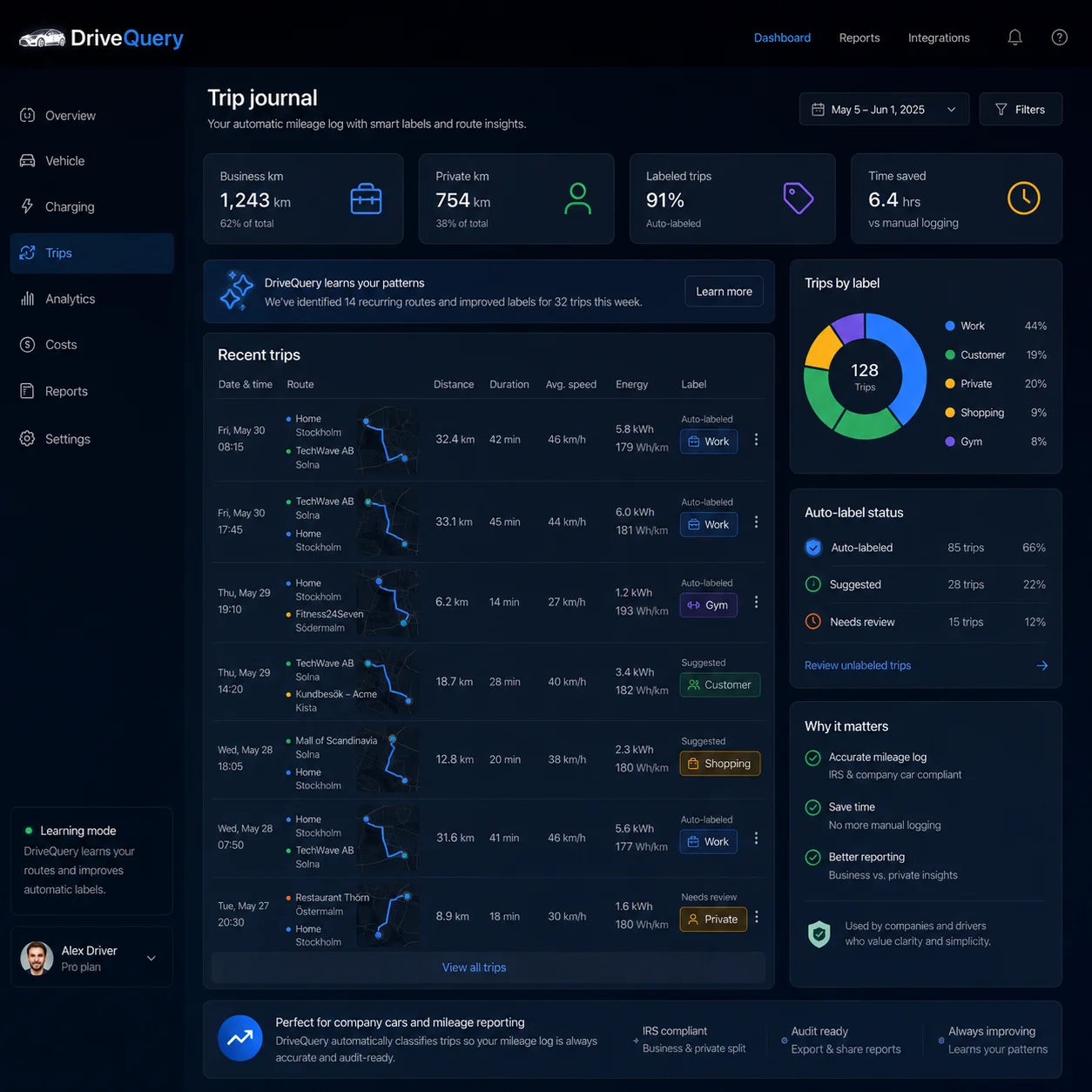
Completed drives stay searchable by date, route, mileage, places and review status after capture.
Why capture matters: Tesla says it does not keep an account-linked history of where you have been. A past route generally cannot be recreated later unless it was captured while the data was available.
What you get
A trip history should answer the obvious questions in seconds
Where?Route + addressUnderstand where a journey started and ended.
How far?MileageKeep distance attached to the drive that created it.
What was it?Your labelBusiness, personal, customer, office — use categories that fit you.
| Trip detail | Why it matters |
|---|---|
| Start and end time | Puts the journey in a reliable timeline. |
| Origin and destination | Makes the trip understandable without remembering where you went weeks later. |
| Distance / mileage | Supports totals, business mileage and reimbursement workflows. |
| Route context | Helps distinguish similar drives, detours and unusual journeys. |
| Battery change | Adds energy context to the individual trip instead of only showing a monthly total. |
| Labels and review status | Lets automation help without silently guessing when the context is uncertain. |
Tesla vs. trip history
Tesla gives you vehicle information. DriveQuery builds the retained journey timeline.
Tesla documents current vehicle location and odometer information in the mobile app. In the vehicle, the Trips view shows counters such as the current drive and driving since the last charge. DriveQuery is designed for a different job: retaining completed journeys as a searchable, reviewable history.
| Need | Tesla's standard experience | DriveQuery trip history |
|---|---|---|
| Current vehicle location | Available in the Tesla app | Used as journey context when authorized |
| Vehicle odometer | Available in the app and vehicle | Useful for trip continuity and mileage history |
| Current / since-last-charge trip counters | Available in the vehicle Trips view | Not the primary use case |
| Retained trip-by-trip timeline | Not the focus of Tesla's documented app experience | Core DriveQuery view |
| Custom journey labels and review queue | Not the focus of Tesla's documented trip counters | Built for repeated review workflows |
Tesla features can change by vehicle, software version and market. This comparison describes the functions Tesla currently documents in its support material, not every screen that may appear in every vehicle.
Trip intelligence
Capture automatically. Ask for help only when the trip is ambiguous.
1CaptureKeep the vehicle journey facts.
→
2ReconstructJoin fragments that belong to one journey.
→
3RecognizeUse destination, timing and distance as context.
→
4ReviewSurface only uncertain cases.
Recurring trips should reduce work, not create false certainty
A familiar destination can be useful context, but the same place does not always mean the same purpose. DriveQuery can learn from recurring routes, timing and your previous choices while leaving low-confidence journeys in Needs review.
High confidenceSuggest the familiar labelRecurring route and timing patterns line up with earlier choices.
Needs reviewShow the exceptionThe context is not strong enough, so the trip stays visible for a quick decision.
Your correctionManual choice winsYour decision becomes the source of truth instead of being silently overwritten.
Short stops and telemetry gaps should not ruin the timeline
A vehicle does not stay connected every second, and a brief stop does not always represent the end of a meaningful journey. DriveQuery is designed to keep the original data, then clean up obvious fragmentation using timing, route and odometer context.
Recovery has limits: if journey data was never captured, software cannot reliably recreate facts that do not exist. DriveQuery can clean up fragmented records, not invent missing telemetry.
Month-end view
Review the exceptions — not every drive again
A useful Tesla driving history should make the month understandable at a glance and keep the trip-level detail underneath the totals.
84example trips captured during the month
7example trips left for quick review
2,599 miexample distance available for reporting
-11%example battery change on an individual trip
Illustrative example only. Your vehicle data determines the actual trip count, distance and battery change.
Use labels that match your life
DriveQuery can show the actual address and let you create labels such as Office, Customer, Job site, Gym or Shopping. It does not need to force every repeated location into generic Home or Work categories.
From trip history to action
One journey record can support several workflows
Business mileage
Classify business, personal and commuting trips and keep the mileage behind the total.
Business mileage tracker →Free mileage log →Location history
Focus on places, routes and recurring destinations rather than mileage classification.
Tesla location history →Missing trip
Work out whether the whole journey or only some of its context failed to appear.
Missing trip guide →Export
Move reviewed trips into a spreadsheet, report or mileage workflow.
Trip history export →Primary sources used for this guide
Frequently asked questions
Can I see Tesla trip history in the Tesla app?
Tesla documents current vehicle location and odometer information in the mobile app, while the in-car Trips view provides trip counters such as the current drive and since-last-charge data. DriveQuery is designed to retain a separate trip-by-trip journey timeline with route, address, mileage and review context.
What does DriveQuery store in Tesla trip history?
DriveQuery is designed to organize completed journeys with start and end times, origin and destination context, distance, route information, battery change where available, user labels and review status.
Is Tesla trip history the same as location history?
No. Trip history organizes completed journeys. Location history adds place and route context around those journeys. A useful driving record can connect both without treating every location point as a separate trip.
Can I use Tesla trip history for business mileage?
Yes. Trip history can provide the factual journey record behind a business mileage workflow. Business purpose and final tax classification still need to be confirmed by the driver or business.
Can I export Tesla trip history?
DriveQuery is being built to export reviewed journey records so trip-level detail can be reused in spreadsheets, reports and mileage workflows.
What if a Tesla trip is missing?
First check whether the whole journey is absent or whether only route, address or classification context is missing. Data that was never captured cannot always be reconstructed, but late or fragmented telemetry can sometimes be cleaned up after the drive.
Keep the trip history. Review only what needs you.
Join early access to turn Tesla drives into a retained, reviewable journey record.