
Tesla location history
Tesla location history: routes, places and past drives in context
The Tesla app can show where your car is now. DriveQuery is being built for the question you ask later: where did I drive, when did I go there, how far was it and what was that trip for?
What Tesla location history can show
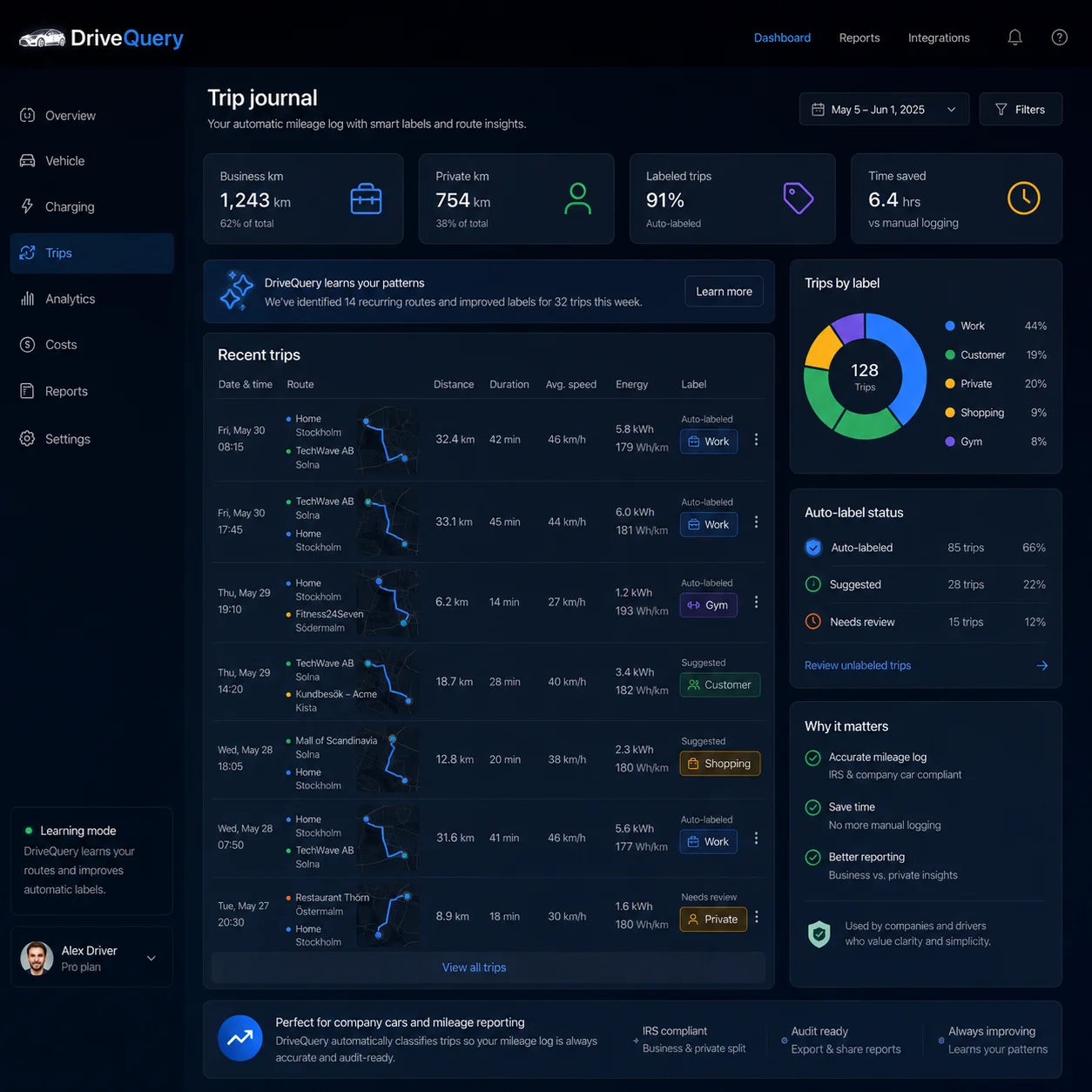
Start and destination
Keep the places that explain a journey together with its time and distance.
Route context
Review the route when location data is available, without pretending that a missing GPS point never happened.
Your own place names
Turn recurring destinations into useful labels such as Office, Customer A, Gym or Airport.
Trip-based by design
DriveQuery records driving context. It is not intended to be a 24/7 personal location tracker.
Can you see Tesla location history in the Tesla app?
You can see the car's current location, but that is not the same as a permanent history of everywhere it has been. Tesla documents a Location feature in the mobile app that can locate the vehicle, provide directions to it and, where supported, track its movement on a map. That is useful when you want to find the car now.
Tesla's own privacy notice makes an important distinction. Tesla says that, by default, it does not associate the location generated by normal driving with your identity or account or keep a history of where you have been. In other words, seeing your car on a live map should not be confused with Tesla maintaining a consumer-facing archive of every past route.
Current location, route history and trip history are three different things
These terms sound similar, but they answer different questions. Knowing the difference helps you choose the right data instead of collecting more location points than you actually need.
| Type of data | What it answers | Typical use |
|---|---|---|
| Current location | Where is the Tesla now? | Finding a parked car, checking where the vehicle is or navigating to it. |
| Route trace | Which roads did the car take during one drive? | Reviewing a journey on a map or understanding an unusual route. |
| Trip history | When did each drive start and end, where, and how far was it? | Mileage logs, expenses, business/private review and remembering previous journeys. |
| Place history | Which recurring destinations does the car visit? | Recognising customers, offices, sites, shops or other regular destinations. |
| 24/7 location tracking | Where is the person or vehicle at every moment? | Continuous surveillance-style tracking, which DriveQuery is not designed to provide. |
Why trip-based location history is usually more useful
A map full of GPS coordinates looks detailed, but detail is not the same as useful information. If you open the data six months later, the questions are usually practical: Was this the customer visit? How many kilometres was it? Did I drive there twice that week? Was this journey business or private?
A good trip record therefore keeps location in context. For each completed drive, the useful core is:
- start time and end time — so the journey belongs to the correct day and reporting period;
- start and destination — enough context to recognise the drive later;
- distance — ideally tied to reliable vehicle data rather than a manually typed estimate;
- route context when available — useful for review, but secondary to the trip itself;
- odometer context — helpful for checking whether the sequence of journeys makes sense;
- your own place labels — so repeated destinations become meaningful instead of anonymous addresses;
- business/private classification and notes — when you need a mileage journal rather than a map.
How DriveQuery turns vehicle location into a journey
DriveQuery is being built around the lifecycle of a trip rather than around constant map polling. The goal is to preserve enough location context to make the drive understandable while keeping the product focused on journeys.
- A drive starts. Vehicle data indicates that a real journey has begun.
- The starting context is recorded. When authorised location data is available, the trip gets a start position or address context.
- The journey is followed. Relevant telemetry can provide route context while the car is moving.
- The drive ends. Parking and vehicle state help define the trip boundary.
- The destination is attached. The end location becomes part of the completed journey.
- You add meaning. A familiar address can be labelled, and the trip can later be classified as business or private.
Tesla's Fleet API separates vehicle-location permission from other vehicle information. For third-party apps, Tesla describes the location permission as including precise vehicle location and coarse location for approximate location services. That separation is useful: location access is explicit rather than something an app should silently assume.
Example: the same place becomes much more useful when it has context
Imagine that your Tesla appears at the same industrial estate four times in one month. Four pins on a map tell you very little. Four completed trip records can tell a much clearer story:
| Date | Journey | Distance | Your label | Purpose |
|---|---|---|---|---|
| 4 Aug | Home → 18 Example Road | 31.8 km | Customer A | Business |
| 4 Aug | Customer A → Home | 32.1 km | Customer A | Business |
| 11 Aug | Office → 18 Example Road | 27.4 km | Customer A | Business |
| 11 Aug | Customer A → Gym | 6.2 km | Gym | Private |
That is the difference between collecting coordinates and keeping a usable driving history. The place is only one part of the record; the journey around it provides the meaning.
Name places once instead of decoding addresses every month
Addresses are precise, but they are not always memorable. A destination such as “Technologiepark 14” may mean a customer, the office, a supplier or a gym. Six months later, the address alone may not tell you which.
DriveQuery is designed to let the user create their own labels for recurring places. That makes future reviews faster: Customer A is immediately understandable, while the underlying address can still remain available for verification.
User-defined labels are also safer than assuming that every recurring destination is “Home” or “Work”. Real driving patterns are messier: people work from several offices, visit customers, move house, share cars and use the same address for different purposes. A label should add context, not silently decide the purpose of a journey for you.
Location history is not the same as a mileage log
A trip can have a perfectly good start and destination and still be incomplete as a business mileage record. Depending on what you need the record for, you may also need the distance, date, purpose, business/private status, odometer readings or other documentation.
That is why DriveQuery keeps the concepts separate:
- location history helps answer where the vehicle went;
- trip history adds when and how far;
- a mileage log adds the classification and evidence needed for your reporting workflow.
If your main goal is expenses or tax records, start with the Tesla mileage log. If the problem is that a particular drive seems to have disappeared, see Tesla trip history missing.
What happens when GPS or connectivity is imperfect?
No real vehicle has perfect connectivity. Underground car parks, tunnels, weak mobile coverage and temporary network interruptions happen. A useful trip journal should not turn one missing location point into a fictional route.
Tesla documents Fleet Telemetry as a way for authorised applications to receive vehicle data directly, and its system is designed to handle ongoing telemetry more efficiently than repeatedly polling the vehicle. Even so, a responsible history should distinguish between what was observed and what was not.
That leads to a simple hierarchy:
- if the trip start, end and distance are reliable but part of the route trace is missing, keep the trip and mark the route context as incomplete;
- if only an address label is wrong, correct the label rather than changing the underlying trip;
- if an entire drive was never captured, do not manufacture precise coordinates afterwards;
- use odometer continuity and surrounding trips as a sanity check when a record looks suspicious.
Can you recover an old Tesla route after the fact?
Sometimes you may find supporting information, but you should not assume Tesla has a complete historical GPS trail waiting to be downloaded. Tesla lets account holders request a copy of certain data associated with their account, and the exact data available can vary. Tesla's privacy material also says that normal driving location is not, by default, linked to your identity or kept as a history of where you have been.
If a journey happened before a trip-history service was connected, possible evidence might include calendar entries, charging records, receipts, navigation destinations, mileage readings or another system you were already using. Those can help you reconstruct a business record manually, but they are not the same as a verified telemetry route.
Privacy: collect the driving context you need, not a 24/7 people tracker
Vehicle location is sensitive data. Tesla reflects that by giving third-party applications a separate Vehicle Location permission, and Tesla also shows an indicator in supported vehicles when GPS location is actively being accessed through the mobile app or a third-party app.
DriveQuery's intended model is narrower than continuous personal tracking. The product is built around vehicle journeys: record the start, route context and destination needed to understand a drive, then turn that into a useful history. The point is mileage and trip context, not watching a person move around when the car is not being driven.
If you connect any third-party Tesla service, review the permissions you grant. Tesla also provides controls for managing third-party app access from your Tesla Account.
What a useful Tesla location-history screen should let you do
A good history should make common questions answerable in seconds. For example:
- show every trip from a chosen day or month;
- open a trip and see its start, destination, time and distance together;
- recognise recurring places through your own labels;
- search or filter by destination;
- review business and private journeys without editing every drive in advance;
- see when route detail is incomplete instead of hiding uncertainty;
- export the resulting trip history when you need to work with it elsewhere.
The result is deliberately closer to a searchable trip journal than to a generic map timeline.
Related Tesla trip-history guides
- Tesla trip history — how a chronological drive record works.
- Tesla trip history missing — what to check when a journey is absent.
- Export Tesla trip history — turn recorded journeys into data you can use elsewhere.
- Tesla mileage log — add business/private context and reporting.
Frequently asked questions
Does the Tesla app show location history?
The Tesla app can show and locate the vehicle on a map, but Tesla does not describe that feature as a permanent, chronological archive of every past drive. A dedicated trip-history service records completed journeys for later review.
Can Tesla show where my car was yesterday?
You should not assume a complete historical GPS route is available after the fact. Tesla's privacy material says it does not, by default, associate normal driving location with your account or keep a history of where you have been.
Can a third-party app access my Tesla's location?
Yes, if you explicitly grant the relevant Tesla permission. Tesla's third-party app permissions include Vehicle Location, covering precise and coarse vehicle-location information.
Is DriveQuery a live vehicle tracker?
No. DriveQuery is designed around completed vehicle trips and the location context needed to understand them. The aim is a useful driving history rather than continuous 24/7 personal tracking.
What should a Tesla location-history record include?
At minimum, a useful trip record should keep the date and time, start, destination and distance. Route detail, odometer context, your own place labels and business/private classification can make it much more useful later.
What if part of a route is missing?
A missing section of GPS detail should not automatically invalidate the whole journey. If reliable start, end and distance data exist, the trip can still be useful while the route is clearly shown as incomplete.
Can I name frequently visited locations?
That is part of the DriveQuery approach. User-defined labels such as Office, Customer A or Gym make recurring destinations easier to recognise without relying on predefined home/work labels.
Can location history be exported?
DriveQuery is being designed so recorded trip history can be used beyond the map view. See the Tesla trip history export guide for the intended CSV/PDF workflow.
Sources and further reading
Remember the journey, not just the pin.
Join the waitlist and build a searchable Tesla trip history from the drives you actually make.