
Tesla trip history
Tesla trip history: past drives, routes and mileage
Automatic Tesla trip history is in early access development. The planned connected product will organise captured journeys with routes, addresses, mileage and reviewable labels. You can use the manual UK mileage log today without connecting a Tesla.
Available now: manual mileage log with PDF and Excel exports. Planned automatic recording: join the early access waitlist.
Available now · no Tesla connection
Create a UK mileage log from addresses today.
DriveQuery calculates the road miles, shows the route on a map and exports PDF or Excel without an account.
Quick answer
How do I see the mileage on a Tesla?
For the car’s current total mileage, Tesla says to open Controls → Software on the touchscreen. Depending on the vehicle and software version, the odometer can also appear in the Trips view. In the Tesla app, scroll to the bottom of the vehicle’s main screen to see the odometer.
That current odometer reading is different from trip history. The planned connected DriveQuery product will build journey records only after a car is connected and data collection starts. It cannot reliably recover a journey that was never captured. Create a manual mileage record if you need a report now.
See the detailed Tesla mileage guide →
Need a mileage report now? The free UK mileage log works without a Tesla connection and exports PDF or Excel.
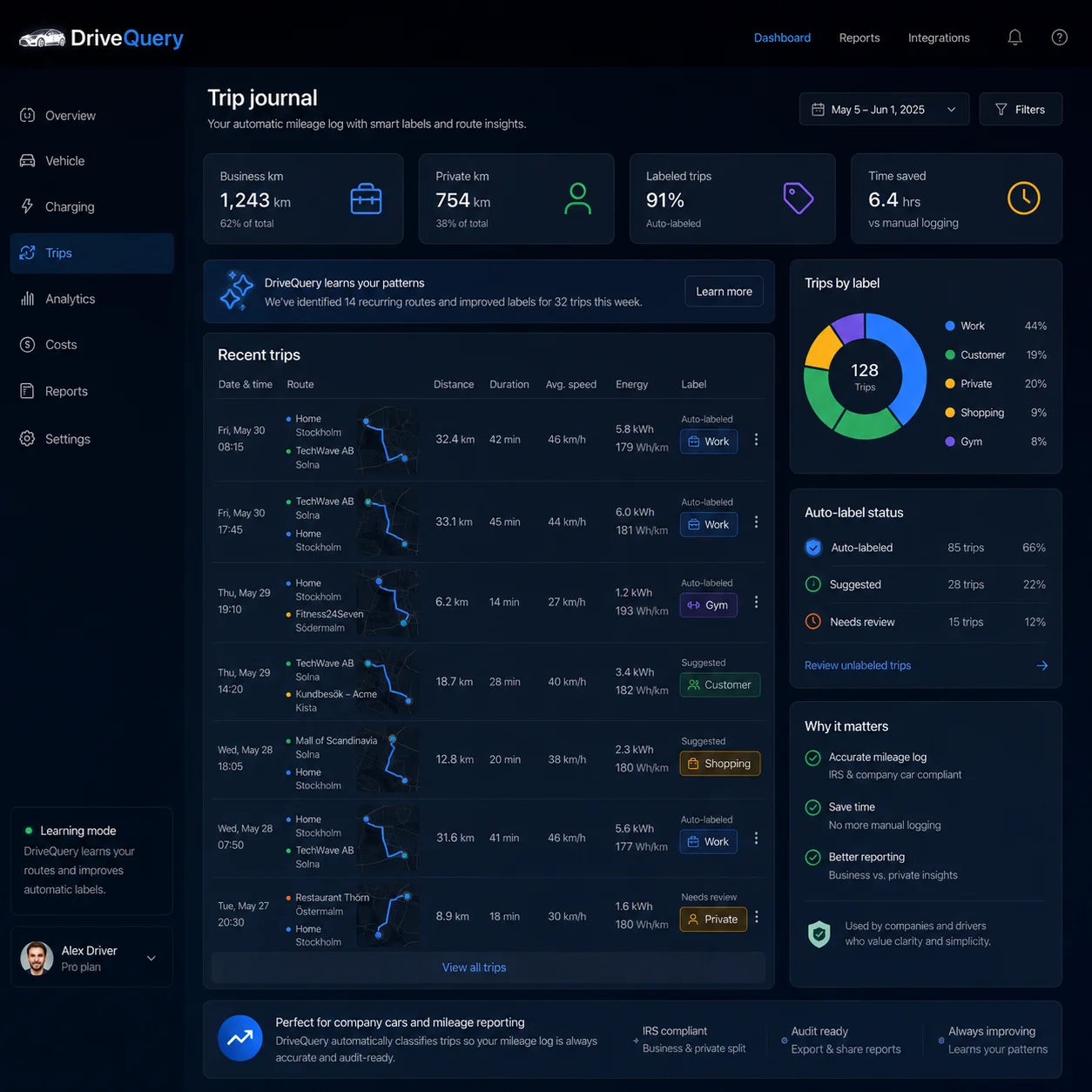
What should a useful Tesla trip history contain?
A useful trip history should let you understand a drive without reconstructing it from separate screens later. The core record is the journey itself: where it started, where it ended, how far the car travelled and when it happened. Route and address context then make the mileage meaningful.
| Trip-history field | Why it matters |
|---|---|
| Start and end time | Places the drive in a clear timeline. |
| Origin and destination | Shows what the journey was actually between. |
| Distance / mileage | Supports mileage review, totals and business/private records. |
| Route context | Helps distinguish similar journeys and understand detours or gaps. |
| Your own labels | Turns repeated destinations into useful categories without forcing generic Home or Work guesses. |
| Review status | Keeps uncertain classifications visible instead of silently inventing an answer. |
Tesla trip history, location history and mileage are related — but not identical
Trip history is the chronological journey record. Location history adds the place and route context around those journeys. Mileage tells you how far the car travelled and becomes especially important when journeys need to be classified or reported.
Keeping these concepts separate makes the record easier to trust: a pin on a map is not a trip, and a monthly mileage total does not explain which journeys created it.
From vehicle telemetry to journeys that make sense
DriveQuery keeps the original drive data intact, then builds a cleaner journey view on top. Short stops, reconnects and gaps in telemetry can create messy boundaries. DriveQuery cleans those up so the history better reflects what actually happened.
A recurring trip is more than a route match
A recurring trip is not identified from a single GPS point. DriveQuery can use destination, origin, weekday, arrival time and distance as context. As the pattern becomes clearer, less manual labelling is needed.
Do not guess when confidence is low
Automation should reduce work, not create more of it. When a classification is uncertain, DriveQuery can leave the trip for review rather than forcing a label. And when you correct a trip yourself, your decision is not silently overwritten later.
Review the exceptions — not the whole month
The point of trip history is to make a month understandable at a glance. A compact summary can show how much was captured automatically, what still needs attention and how driving affected the battery.
Illustrative example only. The goal is to show what a driver would actually need to review at month end.
Show the address. Add the labels that matter to you.
DriveQuery does not force generic Home or Work labels onto your trips. It can show the actual address, while you add labels such as Office, Customer, Gym or Shopping to match your own routines and reporting needs.
Trips can be cleaned up after the drive, too
A car does not stay connected every second. DriveQuery can fill in gaps after the drive, using route, timing and odometer context instead of assuming every live event arrived perfectly.
Planned automatic trip-history features
- Automatic trip capture from Tesla telemetry
- Trip history with route and address context
- User-defined labels and business/private classification
- Classification based on route, destination, timing and distance
- Uncertain trips can be left for review
- Your corrections are never silently overwritten
- Cleanup when telemetry arrives late or in fragments
Need mileage rather than route history? See Tesla mileage and business/private mileage →
Trip-history toolkit
Go deeper when a trip needs more than a timeline
The main Tesla trip history is the hub. Use the specialist pages when the question is about places, a missing journey, exporting records or mileage rather than the timeline itself.
| If you need to… | Use this page |
|---|---|
| Understand where drives started, ended and which places repeat | Tesla location history |
| Investigate a drive that appears to be absent | Tesla trip history missing |
| Take reviewed journeys into another tool or report | Tesla trip history export |
| Focus on odometer, business/private miles and HMRC records | Tesla mileage |
Frequently asked questions
What is Tesla trip history?
For DriveQuery, Tesla trip history means a chronological record of completed journeys built from vehicle telemetry, with timing, distance, route or address context and reviewable labels.
Is trip history the same as Tesla location history?
No. Location history focuses on where the car travelled and the places connected to those drives. Trip history organises that context into completed journeys with start, end and mileage information.
Can I export Tesla trip history?
DriveQuery is being built to export reviewed journey records in reusable formats. The dedicated Tesla trip history export guide explains the CSV/PDF export workflow and the fields worth preserving.
What if a Tesla trip is missing?
First determine whether the whole journey, only its route or only its classification is missing. The missing trip guide explains the checks and the limits of recovering data that was never captured.
Keep the history. Review only what needs your attention.
Join the waitlist if automatic trip history and mileage tracking are what you want from DriveQuery first.
From journey history to a UK mileage claim
Use the manual UK mileage log for journey dates, destinations, business purpose and distance, then export PDF or Excel. Use the HMRC mileage claim calculator to estimate the approved amount and select the relevant tax year. See Mileage Allowance Relief if your employer pays less.
A route, location pin or odometer total does not by itself establish business mileage. Review each journey and keep supporting records; DriveQuery does not guarantee HMRC acceptance.
Can I automatically record Tesla journeys now?
Automatic Tesla journey recording is in early access development. The publicly available mileage log uses journeys you enter manually and does not connect to your Tesla.