
Tesla location history
Tesla location history: can you see past trips?
Automatic Tesla trip recording and the saved journey timeline are in Early Access. Joining the list does not connect your Tesla or recover earlier drives. The free manual mileage log is available now without an account. Open the free mileage log.
The Tesla app can show where your car is now, but Tesla says it does not keep an account-linked history of where you have been. If you need past routes, they generally must have been captured while the drive data was available.
Tesla says its mobile app can locate the vehicle or track its movement on a map. Tesla also says it does not normally keep an account-linked history of where you have driven. Sources are linked below.
Past-trip recovery check
Can you recover a past Tesla trip or route?
The answer depends on whether anything was capturing the drive at the time and whether you need an exact GPS route or just a defensible trip record.
This checker does not access your Tesla. It explains what may be recoverable from data that was already captured.
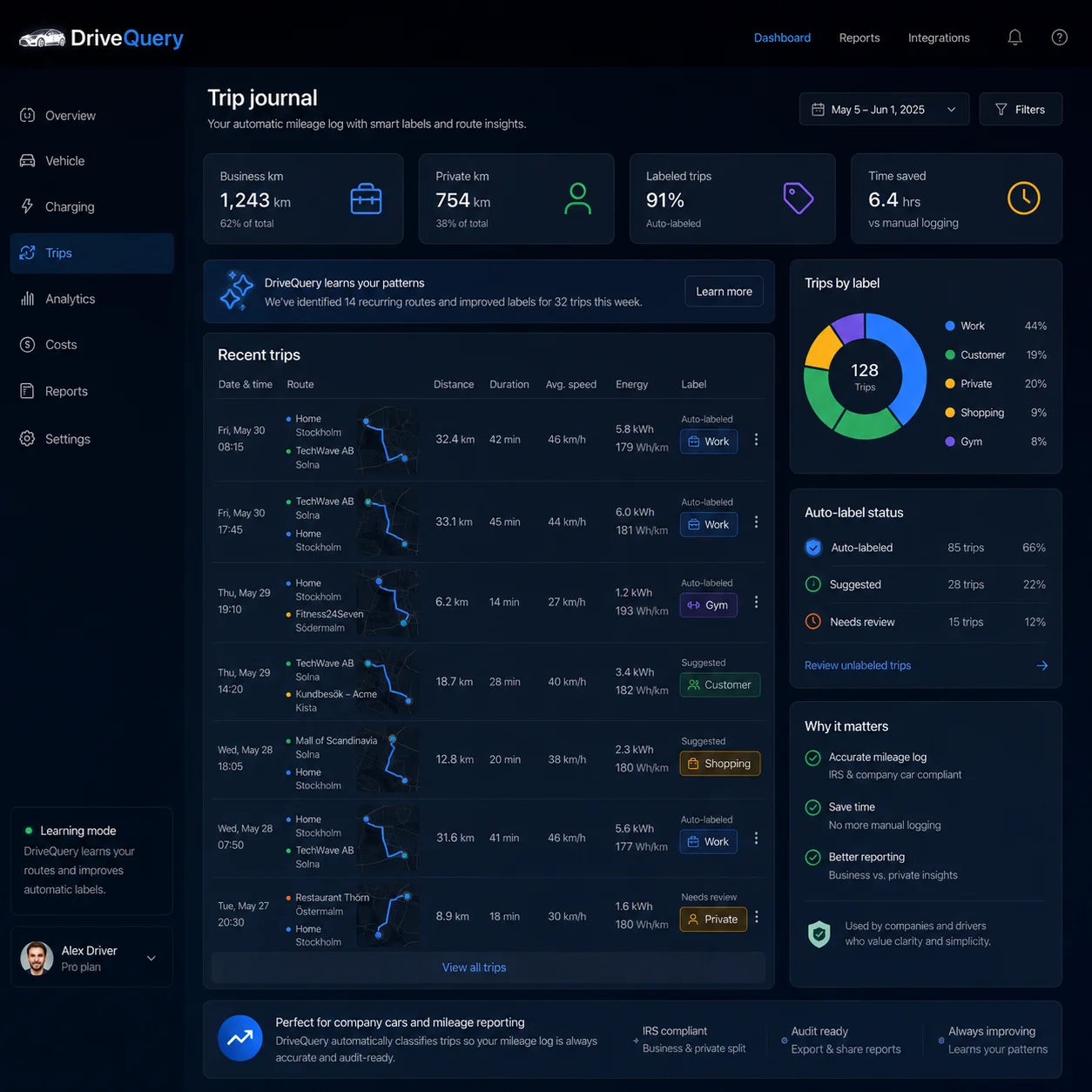
From pin to place
Answer the question you ask later: “Where did I go?”
A useful Tesla location history should let you recognize a drive months later without reconstructing it from memory.
Find the day
Open the drives from a chosen date or reporting period.
Recognize the place
See start and destination together with your own place label.
Understand the journey
Keep route context, mileage and timing attached to the same trip.
Use it
Review, classify or export the trip instead of decoding coordinates.
Live vs history
Does the Tesla app show location history?
It shows vehicle location, but that is different from a chronological archive of past drives. Tesla's current Model 3 manual describes the mobile app Location feature as a way to locate the car, get directions to it or track its movement across a map. That answers where is the car now?
For historical location, Tesla's privacy material takes a different approach. Tesla says that normal driving location is not associated with your identity or account by default and that it does not keep a history of where you have been. The Model 3 manual also states that Tesla cannot provide historical vehicle-location information such as where the car was parked or traveling at a particular date and time.
Current location
- Locate the vehicle
- Get directions to it
- Track movement on a map where supported
- Plan or send navigation to the car
Past trip history
- Completed drives by date
- Start and destination together
- Route context when captured
- Distance, labels and review status
Practical consequence: if you want to know where the Tesla went last month, that history needs to be captured while the trip data is available. A live-location screen cannot reliably recreate a past route later.
Place intelligence
Turn repeated coordinates into places you recognize
The address is evidence. The label is context. DriveQuery keeps those two ideas separate.
Keep the underlying destination, but review it using a name that means something to you.
A label helps you spot patterns without assuming every weekday destination is automatically “Work.”
Recurring does not mean business. The user stays in control of the meaning and classification.
Search by a memorable place instead of scrolling through unfamiliar street addresses.
Why user-defined labels?Real life has multiple offices, customers, shops, shared cars and changing routines. A place label should help you remember a destination — not silently decide why you were there.
What gets stored
Location is one layer of a useful trip record
A map alone is visually rich but operationally weak. When you need the record later, the useful unit is the completed drive.
Enough location context to recognize the journey.
Keep the drive in the correct day and reporting period.
Use vehicle-derived distance context rather than a remembered estimate.
Add your own place name, business/personal status or note when needed.
That makes Tesla location history a supporting layer rather than a surveillance timeline. If your main goal is a chronological list of drives, see Tesla trip history. For taxes or reimbursement, use the business mileage tracker workflow.
Missing data
Show uncertainty instead of inventing a perfect route
Tunnels, underground parking, weak cellular coverage and temporary telemetry gaps happen. The correct response is not to draw a fictional GPS line through missing data.
If start, destination and distance are sound, the trip can remain useful.
Keep uncertainty visible instead of fabricating coordinates.
Use odometer continuity and neighboring trips as checks, not as invented telemetry.
If a whole drive appears absent, use the dedicated Tesla trip history missing guide.
Privacy by purpose
Vehicle location is sensitive. Ask only for what the feature needs.
Tesla Fleet API separates Vehicle Location into its own authorization scope. Tesla describes that permission as access to vehicle location information, including precise and coarse location. Tesla also instructs developers to request only scopes that are immediately necessary for the application to function.
DriveQuery's intended model is trip-based: use authorized location data to understand completed vehicle journeys, then retain the context the user wants in their own history. The goal is not continuous 24/7 people tracking.
FAQ
Tesla location history questions
Does the Tesla app show location history?
The Tesla app can locate the vehicle and, where supported, track its movement on a map. Tesla does not describe this as a permanent consumer-facing archive of every past route.
Can Tesla show where my car was yesterday?
You should not assume Tesla can provide a complete historical GPS route after the fact. Tesla says it does not normally associate driving location with your account or keep a history of where you have been.
Can a third-party app access my Tesla location?
Yes, when you explicitly grant the Vehicle Location permission. Tesla Fleet API separates vehicle location into its own authorization scope.
Is DriveQuery a live vehicle tracker?
No. DriveQuery is designed around completed vehicle trips and the location context needed to understand those drives, not continuous 24/7 people tracking.
Can I name frequently visited places?
Yes. DriveQuery is designed around user-defined labels such as Office, Customer A, Gym or Airport so recurring destinations become easier to recognize.
What if part of a route is missing?
A missing GPS segment should be shown as incomplete rather than invented. If reliable start, destination and distance data still exist, the trip can remain useful while uncertainty stays visible.
Next
Tesla trip history
See how completed drives become a chronological journey record.
Use the dataExport trip history
Take recorded journeys into CSV or reporting workflows.
Business useBusiness mileage tracker
Add purpose and review to Tesla-derived trip facts.
Primary sources
Know the place. Keep the journey.
Build a searchable Tesla trip history around the drives and destinations you want to remember.