
Tesla dynamic tariff charging
Tesla dynamic tariff charging: use changing prices without missing departure
Dynamic tariffs can move the cheapest electricity from one night to the next. This page explains the price-optimisation layer: how changing intervals, battery target and a ready-by deadline can become one practical charging plan. For the wider charging experience, see Tesla smart charging.
How dynamic-tariff charging works
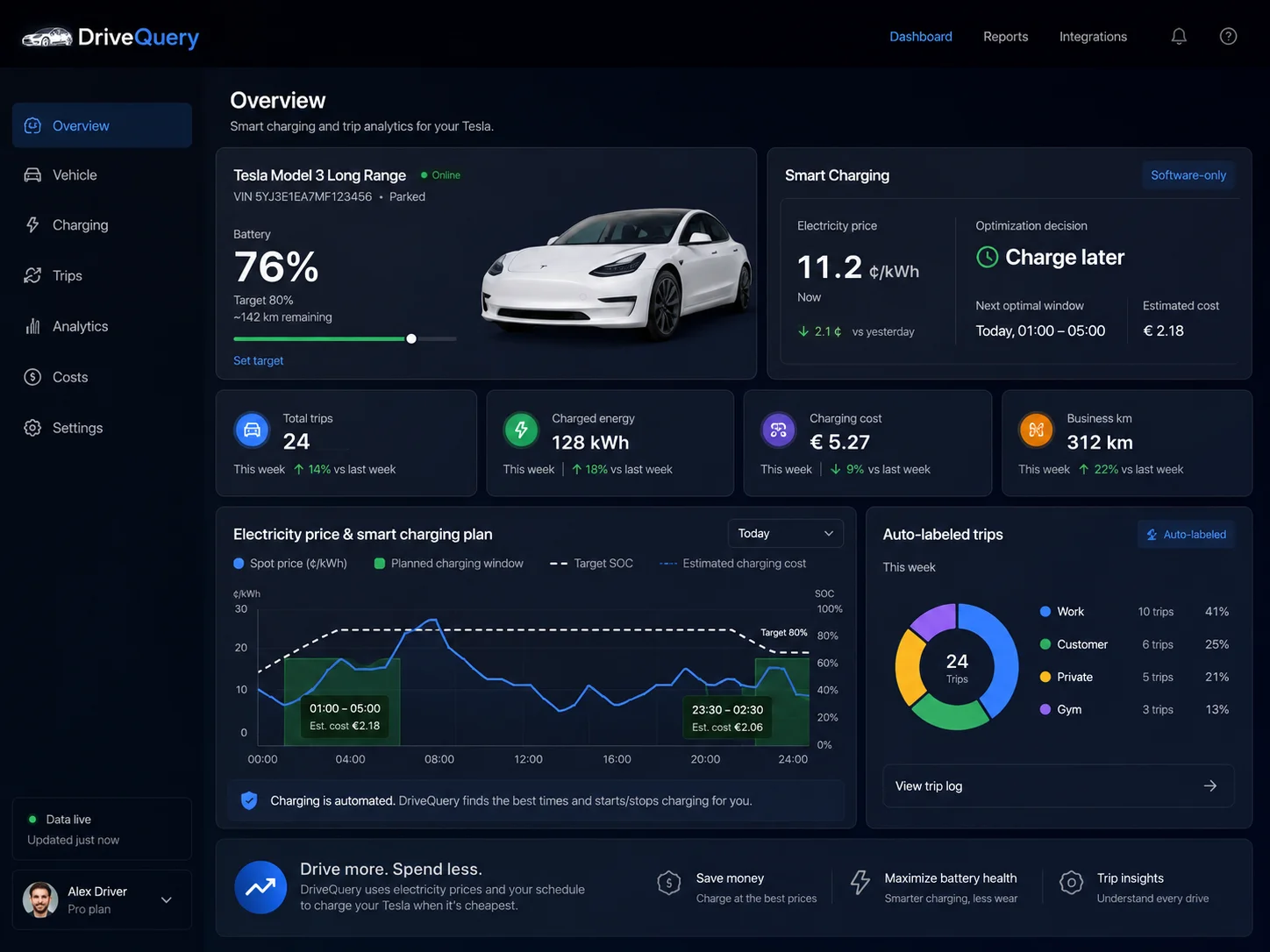
Ready-by deadline
Start with the time the car must be usable. Cheap electricity is only useful if the required charge is complete before departure.
Target state of charge
The gap between the latest reliable battery state and the charge target determines how much charging is actually needed.
Changing price intervals
Compare the eligible tariff periods inside the available window instead of assuming the same cheap hours every night.
Software-first control
Use Tesla connectivity for vehicle-side scheduling and charging control rather than making a specific wallbox the centre of the system.
What is dynamic-tariff Tesla charging?
A fixed off-peak tariff is simple: electricity is cheap during the same predefined window each day, so a recurring charging schedule may be enough. A dynamic tariff changes the energy price much more frequently. The cheapest periods can move around the clock, and several of the cheapest intervals may not be consecutive.
Smart EV charging uses that flexible charging window without putting the departure deadline at risk. To put pounds around the difference, compare scenarios in the UK electric car charging cost calculator.
That turns EV charging into a small optimisation problem. The scheduler needs to know how much charging is required, when the car must be ready and what each eligible interval costs. Finding the single cheapest half hour does not help if the car needs four or five hours of charging before the morning commute.
Ofgem has said that half-hourly settlement is expected to support the growth of smarter time-of-use tariffs in Great Britain, rewarding households that can shift demand into cheaper periods. An EV is unusually well suited to that kind of flexibility because it can often remain plugged in for many hours while needing power for only part of that window.
Dynamic charging is different from a normal Tesla schedule
Tesla already lets owners create charging schedules in the vehicle or Tesla app. Tesla's current scheduling controls can specify when charging starts and stops for a location. That is useful when your tariff has predictable off-peak hours.
The difference with a dynamic tariff is that the preferred window may change every day. A schedule such as “charge from 00:30 to 04:30” cannot know that tomorrow's cheapest periods are 23:00–00:00, 02:00–03:00 and 04:00–06:00.
| Approach | What it knows | Best fit |
|---|---|---|
| Tesla vehicle schedule | Configured start/stop times and location | Fixed or predictable cheap periods |
| Wall Connector schedule | Configured charger availability window | Simple recurring home-charging rules |
| Tesla Rate Plan Charging | Home utility rate plan, desired charging duration and end-charging deadline | Homes with the required Powerwall + compatible Wall Connector setup |
| DriveQuery dynamic optimiser | Price intervals, latest reliable vehicle state, target charge and ready-by time | Price-aware Tesla scheduling without making Powerwall a prerequisite |
See Tesla's current vehicle charging-schedule guidance and Rate Plan Charging documentation for the capabilities available in Tesla's own ecosystem.
The optimisation starts with the deadline, not the cheapest price
A good scheduler works backwards from the outcome you need. Imagine the car is plugged in at 21:30, must be ready at 07:00 and needs roughly five hours of charging. The tariff publishes different prices through the night.
The numbers below are deliberately illustrative rather than current market prices:
| Hour | Example price | Selected? |
|---|---|---|
| 22:00–23:00 | 24p/kWh | No |
| 23:00–00:00 | 18p/kWh | No |
| 00:00–01:00 | 7p/kWh | Yes |
| 01:00–02:00 | 16p/kWh | No |
| 02:00–03:00 | 5p/kWh | Yes |
| 03:00–04:00 | 13p/kWh | Yes |
| 04:00–05:00 | 4p/kWh | Yes |
| 05:00–06:00 | 8p/kWh | Yes |
| 06:00–07:00 | 22p/kWh | No |
If the car could charge at a steady 7 kW and needed exactly five hours, those selected periods would deliver about 35 kWh. The illustrative energy cost would be about £2.59. Charging continuously from 00:00 to 05:00 using the same example prices would cost about £3.15.
Real charging power, losses, battery temperature, charge taper, tariff taxes and supplier rules can change the result. The point is the scheduling logic: choose enough low-cost periods to meet the deadline, rather than blindly charging through one fixed block.
What information does a ready-by optimiser need?
| Input | Why it matters |
|---|---|
| Plug / charging state | The optimiser should only plan charging when the vehicle can actually receive power. |
| Latest reliable battery state | Provides the starting point for estimating how much charge is needed. |
| Charge target | Defines the desired end state rather than assuming every session should reach 100%. |
| Ready-by time | Defines the hard end of the flexible charging window. |
| Available charging power | Determines how much energy can realistically be added in each interval. |
| Dynamic tariff intervals | Provide the cost ranking used to select the preferred periods. |
| Location | Prevents a home tariff or home schedule from being applied at the wrong place. |
| Manual override state | Lets a user-requested immediate charge take priority over automatic optimisation. |
The optimiser should also understand uncertainty. A battery percentage read several hours ago can still be useful if the car has remained parked, while a stale value after a drive is not. The goal is not to wake the vehicle every few minutes just to make the dashboard look current.
How DriveQuery's planned charging decision works
- Confirm the charging context. Is the Tesla at the configured charging location and plugged in?
- Use the latest reliable state. Read current data when available, otherwise use trustworthy recent state rather than waking the car unnecessarily.
- Calculate the remaining requirement. Compare battery state with the user's target and estimate the charging time needed.
- Load the price intervals. Use the tariff prices that apply before the ready-by deadline.
- Select enough low-cost periods. Rank or optimise the eligible intervals while preserving enough time to finish.
- Apply the plan conservatively. Avoid sending the same command again when the schedule has not materially changed.
- Respect the driver. If the user has deliberately started charging now, the optimiser should not immediately stop that manual session to chase a cheaper price later.
- Re-plan only when something relevant changes. A material SOC change, plug event, tariff update, target change or deadline change can justify a new plan.
This is also why DriveQuery is being designed as more than a “cheapest hour” alert. The useful output is a plan that is cheap and operationally safe.
Why avoiding unnecessary wake-ups matters
A connected-car optimiser can become counterproductive if it constantly polls the vehicle or repeatedly pushes commands. The car does not need to be fully awake all night simply so an app can re-confirm information that has not changed.
A better pattern is event- and state-driven:
- use telemetry updates when the vehicle naturally reports them;
- retain the last reliable SOC, target, location and plug state;
- avoid re-submitting an identical plan;
- use a small tolerance where tiny SOC changes would otherwise trigger needless replanning;
- wake or command the car only when control is actually required.
That reduces command churn and makes the charging automation less intrusive.
What happens if I plug in and want to charge immediately?
Automatic optimisation should never make manual charging confusing. If you plug in and intentionally start charging, the most predictable behaviour is to treat that as an override for the current session. The optimiser can resume its normal rules the next time you plug in or once the manual state is explicitly released.
Tesla takes a similar user-first approach in Rate Plan Charging: Tesla documents a Charge Now option that temporarily starts charging immediately while leaving Rate Plan Charging as the default for future sessions.
Does DriveQuery need a Tesla Wall Connector?
The planned DriveQuery approach is vehicle-side and software-first. A Tesla Wall Connector can still be useful — especially for charging history, Wi-Fi connectivity and charger-side schedules — but it is not intended to be a mandatory controller for DriveQuery's price optimisation.
Tesla's Fleet API currently documents vehicle commands for starting and stopping charging, changing the charge limit and setting charging amps. Tesla also exposes newer scheduling commands, while older scheduled-charging endpoints are being superseded on newer firmware. That means an implementation should follow the current Tesla command model rather than assume one legacy schedule endpoint will remain the right interface forever.
See Tesla's Fleet API vehicle-command documentation.
Where Tesla Rate Plan Charging already solves the problem
Tesla's Rate Plan Charging is important competition — and it already addresses much of this need for qualifying Tesla Energy homes. Tesla says the feature uses the home's utility rate plan to charge during lower-cost periods while meeting a Desired Charging Duration before an End Charging By deadline.
The current system requirements include a supported Powerwall, Wall Connector 3 or Universal Wall Connector and a compatible Tesla app version. Tesla also warns that vehicle-level charging schedules can conflict with Rate Plan Charging.
If you already have that ecosystem and your tariff structure is supported, Tesla's own feature may be all you need. DriveQuery's opportunity is different: provide a vehicle-centric optimiser for Tesla owners who want dynamic-price scheduling without making a Powerwall-based home-energy setup a prerequisite.
Dynamic tariffs make charging history more valuable
Optimisation should be measurable afterwards. A charging plan that claims to save money should let you inspect what actually happened: when the vehicle charged, how many kWh were added, what tariff interval applied and what the resulting cost estimate was.
That is why DriveQuery's smart-charging concept connects naturally with Tesla charging history, charging cost tracking and charging-history export. The same session history can answer:
- How much energy was charged in cheap versus expensive periods?
- Did the optimiser meet the ready-by target?
- Did a manual override explain an expensive session?
- Was a tariff or target changed during the month?
- How much did home charging cost compared with Supercharging?
Tesla Charge Stats already provides useful time-of-use views and encourages owners to shift charging towards off-peak periods. A session-level history adds the audit trail needed to explain a specific optimiser decision.
Dynamic charging is not only about finding the absolute minimum price
The lowest theoretical energy cost is not always the best real-world plan. A robust optimiser may need to favour reliability over a tiny extra saving.
- Leave margin before departure. Do not schedule the final required minute exactly at the ready-by deadline.
- Account for uncertain charging power. Cold batteries, voltage limits or shared electrical capacity can reduce actual power.
- Protect the user's charge target. The optimiser should not lower the requested target just because electricity is expensive.
- Do not chase tiny price differences with excessive start/stop cycles. A few pence of theoretical saving is not worth brittle behaviour.
- Keep tariff components visible. Wholesale or market price is not automatically the same as the final retail unit price on the bill.
The product goal is therefore lowest practical cost subject to being ready, not mathematically lowest price at any operational cost.
What if prices change after the plan is created?
That depends on the tariff. Some suppliers publish the next day's intervals in advance; others can have different rules or revisions. A scheduler should store the price series used for the plan and decide whether an update is material enough to justify replanning.
If the revised plan saves only a negligible amount, keeping the existing schedule can be more predictable. If a major price change creates a clearly better window while preserving the ready-by deadline, a re-plan can make sense.
What if the car goes offline?
A sleeping or temporarily offline Tesla should not automatically make the plan unusable. If the car was parked at home, plugged in and its latest SOC and target are recent and internally consistent, the optimiser can often continue planning from that state. It should become more conservative when the state is stale or when there is evidence the vehicle has moved.
The safest rule is simple: use known state when it is reliable; do not invent state when it is not.
Frequently asked questions
Does Tesla already support scheduled charging?
Yes. Tesla currently lets you configure charging start and stop times by location in the vehicle and Tesla app. A fixed schedule works well for predictable off-peak tariffs; a dynamic optimiser adds value when the cheapest periods change from day to day.
How is DriveQuery different from Tesla Rate Plan Charging?
Tesla Rate Plan Charging already optimises around a rate plan and an end-charging deadline for homes with the required Powerwall and compatible Wall Connector setup. DriveQuery is being designed as a vehicle-centric alternative that can use dynamic price intervals without requiring that specific Tesla Energy hardware combination.
Does DriveQuery require a Tesla Wall Connector?
The planned architecture does not. It uses Tesla vehicle connectivity for the charging decision. A Wall Connector can still provide useful charger-side data and scheduling features.
Can the optimiser charge in several separate cheap periods?
That is the intended dynamic-tariff behaviour. If the tariff has non-consecutive cheap intervals, the optimiser can select enough eligible periods to meet the charging requirement before the deadline, subject to vehicle and API control constraints.
What happens if I manually start charging?
A deliberate manual start should take priority for that session. DriveQuery is being designed not to immediately stop user-started charging just because a cheaper period exists later.
Does the Tesla have to stay awake all night?
No. The design goal is to use telemetry and the latest reliable state where possible, avoid unnecessary polling and send commands only when the plan actually requires vehicle control.
Can dynamic charging guarantee the absolute cheapest possible bill?
No. Real costs also depend on charging losses, actual power, tariff components, supplier rules, manual overrides and price availability. The optimiser can minimise the cost of the controllable charging window while preserving the ready-by requirement.
Can I see whether the optimisation actually saved money?
That is where session-level charging history helps. Keeping the actual charging intervals, kWh and price basis allows you to compare the realised plan with a fixed schedule or other baseline instead of relying on an unexplained savings estimate.
Official sources and related guides
- Tesla: vehicle charging schedules
- Tesla: Rate Plan Charging
- Tesla: Charge Stats and time-of-use charging
- Tesla Fleet API: vehicle charging commands
- Ofgem: half-hourly settlement and smarter time-of-use tariffs
- DriveQuery smart charging
- How to charge a Tesla during the cheapest hours
- Tesla charging cost tracker
- Export Tesla charging history
Set the deadline. Let the optimiser use the flexible hours.
Join the waitlist if dynamic-tariff Tesla charging is the DriveQuery feature you want first.