
Tesla charging history export
Turn Tesla charging history into a report you can actually use
A practical guide to exporting Tesla charging data for spreadsheets, accounting, employer reimbursement and cost analysis — with a clear distinction between session history, estimates and final invoices.
What a useful charging-history export should preserve
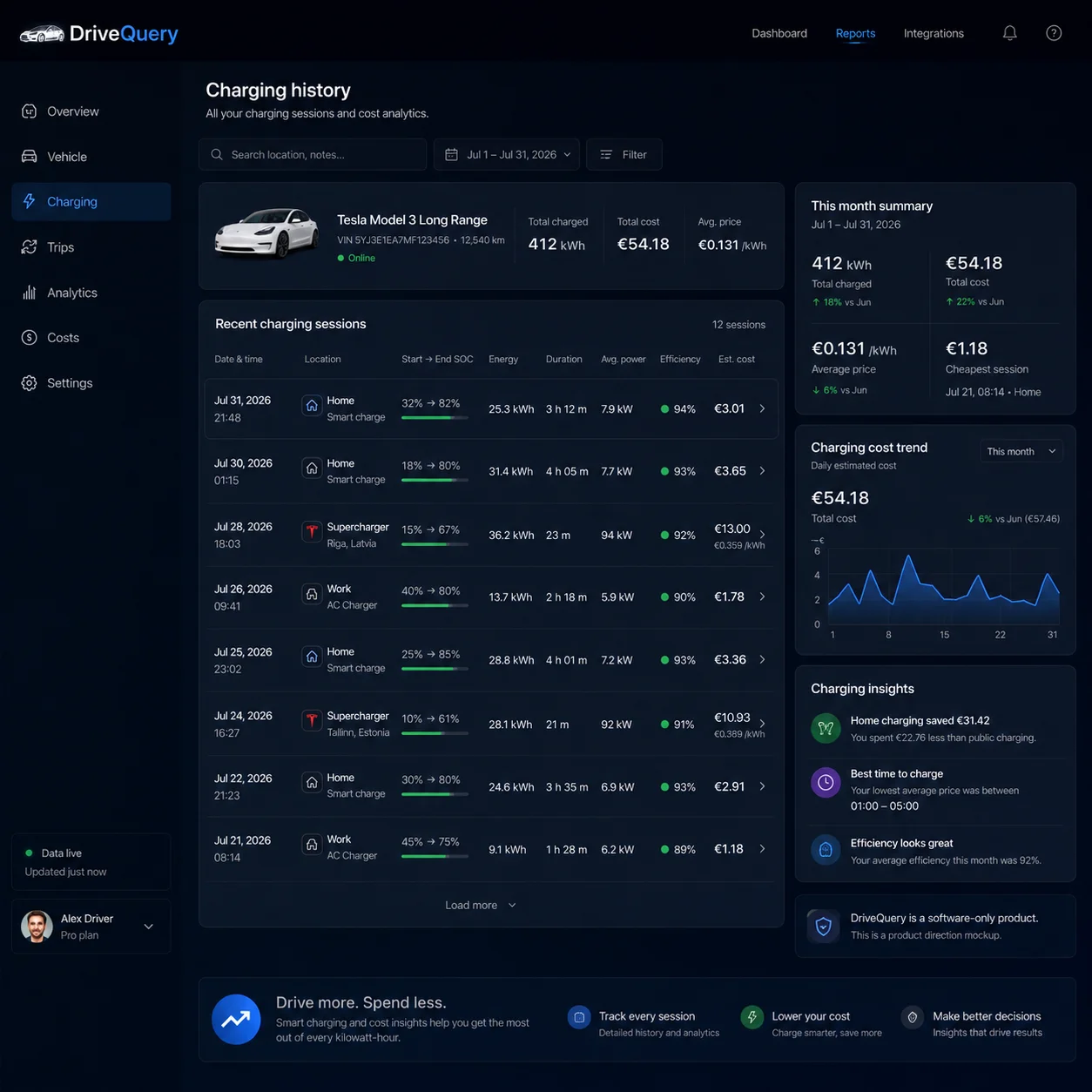
One session per row
Keep date, time, location, kWh, price basis and cost in a structure that works in a spreadsheet.
A report people can review
Turn the same underlying sessions into a monthly summary for finance, an employer or your own records.
Estimate versus invoice
Keep calculated home-charging costs separate from final Supercharger or public-charging bills.
Traceable totals
A monthly total is more useful when you can still drill back to the charging sessions behind it.
A charging graph and a charging export solve different problems
The Tesla app is already useful for understanding charging behaviour. Tesla Charge Stats can show charging history over a selected period, energy charged, estimated charging spend and a breakdown by charging location type. That is excellent for answering questions such as “how much did I charge at home this month?” or “how does my charging cost compare with petrol?”
An export is useful when the next question is different: which individual charging sessions created that total, how was each one priced, and can I store or share the result outside the app?
That distinction matters for expenses, reimbursement, accounting, fleet reporting and anyone who wants to analyse charging in a spreadsheet. A chart is designed to be read. An export is designed to be reused.
What Tesla already gives you
Before adding another tool, it is worth understanding what is already available in the Tesla ecosystem. Depending on the hardware and charging type, Tesla provides several different views of charging data:
| Tesla source | What it is good at | What it is not |
|---|---|---|
| Vehicle Charge Stats | Energy and estimated spend over a selected period, grouped by charging location type. | Not a general-purpose accounting export with one normalised row for every charging source. |
| Wall Connector history | Up to 12 months of listed charge sessions, including duration and energy delivered. | Specific to a registered Tesla Wall Connector rather than every place the vehicle charges. |
| Supercharging history | Final charging transactions and downloadable invoices. | Only Tesla Supercharging, not home or third-party charging. |
| Tesla data request | A broader copy of data associated with the Tesla Account, which may include Supercharging history and vehicle usage information. | A privacy/data-access process rather than a recurring monthly reporting workflow. |
DriveQuery should therefore add value by normalising charging history around the vehicle and the session, rather than pretending Tesla has no charging history of its own.
What should a Tesla charging-history export contain?
A useful export needs enough information to explain both the energy and the money. At minimum, a session-level CSV should make it possible to answer: when did the charge happen, where did it happen, how much energy was involved, how was the price determined and what did the session cost?
| Field | Why it matters |
|---|---|
| Date | Lets you group sessions into days, weeks, months and accounting periods. |
| Start and end time | Essential when electricity prices change by time of day or in shorter market intervals. |
| Duration | Useful for checking unusually long sessions and comparing charging behaviour. |
| Charging location | Separates home, work, Supercharging and other public charging. |
| User label | Turns coordinates or an address into something meaningful such as Office, Client A or Holiday home. |
| Energy | Provides the kWh basis for energy and cost calculations. |
| Price basis | Shows whether the cost came from a fixed tariff, time-of-use tariff, dynamic price, invoice or estimate. |
| Session cost | Makes individual charging events reviewable instead of exposing only a monthly total. |
| Cost status | Helps distinguish an estimate from a final billed amount. |
| Vehicle | Important where an account, household or business uses more than one EV. |
Example: what one week of exported charging could look like
| Date | Location | Energy | Price basis | Cost |
|---|---|---|---|---|
| 3 Aug | Home | 24.8 kWh | Off-peak tariff 8p/kWh | £1.98 |
| 5 Aug | Client A | 11.2 kWh | Free destination charging | £0.00 |
| 7 Aug | Supercharger | 37.6 kWh | Tesla invoice | £18.42 |
| 9 Aug | Home | 31.5 kWh | Off-peak tariff 8p/kWh | £2.52 |
That table is deliberately simple. The important part is provenance: the home sessions use a tariff calculation, while the Supercharger session uses the final transaction. The export should not silently pretend those two cost sources have the same evidential strength.
CSV and PDF are not interchangeable
CSV: best for analysis
A CSV is useful when the next step happens in Excel, Google Sheets, accounting software or your own script. You can filter by location, sum kWh by month, compare tariffs, calculate cost per kilometre and reconcile selected sessions against invoices.
The most useful CSV is boring: stable column names, consistent date formats, one charging session per row and no merged cells or presentation tricks.
PDF: best for review and attachment
A PDF is useful when another person needs to approve or archive the result. A good monthly PDF should show the period, vehicle, headline energy and cost totals, then enough session detail to explain those totals without requiring access to DriveQuery.
For employer reimbursement, the ideal workflow is often CSV for the person doing the analysis, PDF for the person approving the claim.
Estimated cost and billed cost should never be mixed silently
Tesla Charge Stats can calculate estimated charging spend. At home, that estimate depends on the electricity pricing configured in the app. Tesla supports custom rates and time-of-use periods. That is useful, but an estimate derived from a tariff is not automatically the same thing as the final amount on a household electricity bill.
At a Supercharger, there is usually stronger evidence: Tesla lets owners view charging history and download invoices. For those sessions, the final billed transaction should normally take priority over a generic kWh × tariff estimate.
Use the strongest cost source available and keep the source visible. Invoice beats tariff. Tariff beats an unexplained average. Estimate should stay labelled as an estimate.
Fixed, time-of-use and dynamic electricity tariffs need different export logic
Fixed tariff
If every imported kWh costs the same amount, session cost can be calculated simply from energy multiplied by the relevant unit rate. Even then, decide separately how standing charges, taxes or other fixed components should be treated.
Time-of-use tariff
If electricity is cheaper overnight, the start and end time become part of the financial record. A session that crosses two tariff periods may need to be split or priced using interval-level data rather than one flat rate.
Dynamic tariff
With hourly, half-hourly or quarter-hourly pricing, a monthly average destroys the reason for having dynamic pricing in the first place. The stronger approach is to match charging energy to the price interval that applied at the time.
This is also why a charging-history export and a dynamic-tariff charging app fit naturally together: one decides when charging should happen, while the other makes it possible to verify what actually happened.
Vehicle kWh, Wall Connector kWh and electricity-meter kWh can differ
Charging data can be measured at different points. A Wall Connector records energy delivered through the charger. Vehicle telemetry may represent energy or charging state from the car's side. A household smart meter measures electricity imported by the property. Those numbers can differ because charging itself has losses and the vehicle can consume energy for battery conditioning and other systems while connected.
For personal cost tracking, a vehicle-level record may be perfectly useful. For exact household reimbursement or a process that requires a certified meter reading, the wallbox or electricity meter may need to remain the source of truth.
Five practical reasons to export Tesla charging history
1. Employer home-charging reimbursement
Export only the relevant home sessions, apply the employer's agreed pricing method and provide a monthly total with the underlying records still visible. See our Tesla home charging reimbursement guide for the UK tax context.
2. Monthly charging-cost reconciliation
Compare the export with electricity bills, Supercharger invoices and third-party charging receipts. This is especially useful when a dashboard estimate suddenly looks too high or too low.
3. Dynamic-tariff verification
Check whether most home energy was actually taken during the cheapest periods, rather than trusting a schedule configuration alone.
4. Cost-per-distance analysis
Combine charging cost with trip distance to calculate a more meaningful cost per mile or kilometre. A charging export becomes more valuable when it can be connected to the trip-history export.
5. Long-term ownership records
A structured local archive lets you compare seasons, years, charging locations and tariff changes without depending on one app view remaining unchanged forever.
What about Tesla's own data request?
Tesla lets owners request a copy of data associated with their Tesla Account. Tesla says the result may include Supercharging history and vehicle usage information, and the user can specify a time range. That is useful for privacy and data access.
It is not the same workflow as generating a clean charging report every month. Tesla notes that some data may not be stored, may only be retained briefly or may not be part of a standard request. Tesla also says the request can take up to the applicable legal response period, up to 30 days in its general guidance.
So the two tools answer different needs: a Tesla data request is an account-data archive; a DriveQuery export is intended to be a repeatable operational report built from charging data captured for that purpose.
Third-party access is permission-based
Tesla's current third-party app permission model explicitly includes a Vehicle Charging Management category. Tesla describes that category as including data such as charging history, billed amount and charging location, alongside charging-management commands.
The important user-control point is that access is granted deliberately and can be revoked. DriveQuery should request only the data categories needed for the features the user enables, and it should make the difference between read-only reporting and active charging control clear.
A sensible charging-export workflow
- Capture the session. Keep start/end time, vehicle, location and energy together.
- Classify the location. Home, work, Supercharger, public charger or a user-defined label.
- Attach the price basis. Fixed rate, time-of-use rate, dynamic interval, invoice or another documented source.
- Calculate or import the cost. Keep estimates clearly separate from billed amounts.
- Review exceptions. Missing energy, implausible duration, unknown location or a session that crosses tariff periods should be visible.
- Close the period. Sum energy and cost without losing the individual rows underneath.
- Export. Use CSV for analysis and PDF for review, reimbursement or archiving.
What DriveQuery is being built to add
DriveQuery is not trying to replace every charging screen Tesla already provides. The planned value is a consistent history around the vehicle, with charging sessions, user-defined locations, price context and exports that connect to the rest of the ownership record.
- Session-level charging history across relevant charging locations.
- User-defined labels instead of relying only on predefined home/work categories.
- Tariff-aware estimated costs for home charging.
- A clear distinction between estimates and stronger billed evidence.
- Period totals that remain traceable to individual sessions.
- Planned CSV and PDF reports.
- Links between charging cost and trip distance for cost-per-mile analysis.
The export workflow described here is part of the DriveQuery product being validated. Exact fields and file formats may evolve before general availability.
Frequently asked questions
Can I export Tesla charging history directly from the Tesla app?
Tesla provides several forms of charging history, but they are not one universal vehicle-level CSV export. Charge Stats is primarily an in-app analytics view, registered Wall Connectors can show up to 12 months of session history, and Supercharger invoices can be downloaded separately.
Does Tesla show individual charging sessions?
For a registered Wall Connector, Tesla says the app can show a list of charge sessions for up to 12 months, including duration and energy delivered. Vehicle Charge Stats is a different view focused on aggregate charging behaviour and spend.
Can I download Supercharger invoices?
Yes. Tesla says owners can open Charging History in the app and download Supercharging invoices by date, vehicle and file type.
What should a charging CSV contain?
At minimum: date, start/end time, charging location, energy, price basis, session cost and vehicle. For more advanced use, add duration, user label, cost status and period identifiers.
Should a PDF contain every charging session?
Usually yes, but it can place the summary first. A useful PDF shows headline totals and then the session detail needed to explain those totals.
Why does my vehicle's kWh differ from my electricity bill?
The measurements can represent different points in the charging chain. Conversion losses, battery conditioning and other vehicle loads can mean wall energy and vehicle-reported energy are not identical.
Can Tesla's privacy data request replace a monthly charging export?
Not really. It can be useful for obtaining account-associated data, including Supercharging history where available, but it is a broader data-access process rather than a recurring operational report, and Tesla does not guarantee that every possible data item is stored or included.
Is DriveQuery's charging export available now?
The export workflow is part of DriveQuery's early-access product development. The goal is to make captured charging sessions usable as structured CSV and readable PDF-style reports while preserving the source and confidence of each cost figure.
Official Tesla sources and related guides
- Tesla: Understanding Charge Stats
- Tesla: Wall Connector charging history in the Tesla app
- Tesla: Supercharging history, pricing and invoices
- Tesla: Obtain a copy of data associated with your Tesla Account
- Tesla: Managing access with third-party apps
- Tesla charging history guide
- Tesla charging cost tracker
- Tesla home charging reimbursement
Make your charging history useful outside the Tesla app.
Join the waitlist and help us shape the CSV and PDF exports around real charging, cost and reimbursement workflows.